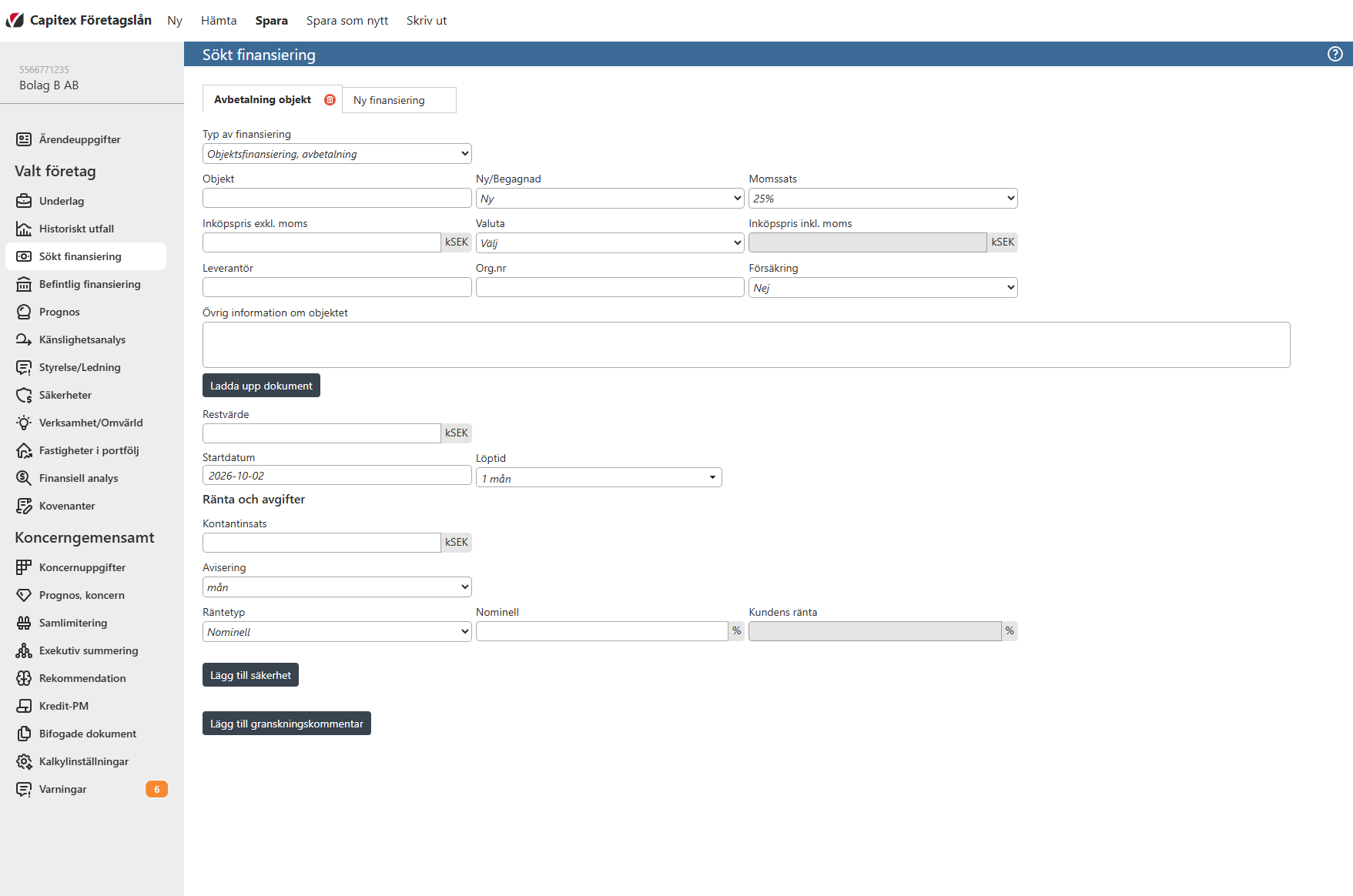
“Objektsfinansiering, avbetalning“ / “Object financing, installment” is used to assess financing for the purchase of a specific asset, such as machinery, a vehicle or other equipment, with repayment in instalments. The information is used to calculate repayments, interest and the financing’s effect on the company’s forecast and cash flow.
“Produkt” / “Product” - Select the financing product. This field appears when products are available in the configuration.
“Objekt” / “Object” - Identify the asset to be leased, for example its name or model.
“Ny/begagnad” / “New/used” - Specify whether the asset is new or used.
“Momssats” / “VAT” - Specify the VAT rate applicable to the asset.
“Inköpspris exkl. moms” / “Acquisition cost excl. VAT“ - Enter the asset’s purchase price excluding VAT. This forms the basis of the financing.
“Valuta“ / “Currency” - Select the currency for the purchase price and financing.
“Marknadsvärde” / “Market value” - Enter the asset’s market value. This field is displayed only when Used is selected.
“Inköptspris inkl. moms” / “Acquisition cost incl. VAT“ - Displays the automatically calculated purchase price including VAT.
“Leverantör” / “Supplier” - Enter the name of the asset’s supplier.
“Org.nr” / “Org.no” - Enter the supplier’s company registration number.
“Försäkring” / “Insurance” - Specify whether or not the asset is insured.
“Försäkringsbolag” / “Insurance company“ - Enter the insurer’s name. Displayed only when insurance is set to Yes.
“Övrig information om objektet” / “Other information about the object“ - Enter any additional information about the object.
“Restvärde” / “Residual value“ - Enter the asset’s residual value at the end of the lease term. This is used to calculate the leasing fee.
“Startdatum” / “Start date“ - Enter the date on which the lease starts.
“Löptid“ / “Term“ - Specify the length of the lease agreement.
“Kontantinsats“ / “Down payment“ - Enter the company’s initial contribution towards the purchase price. This reduces the amount financed.
“Avisering” / “Notification“ - Select the payment frequency, such as monthly or quarterly.
“Räntetyp” / “Interest type” - Select a nominal interest rate of a reference rate, such as STIBOR.
“Nominell/Marginal” / “Nominal/Margin” - For a nominal interest enter the annual rate as a percentage. For reference-rate interest, enter the margin in percentage points added to the reference rate.
“Basränta” / “Base rate” (e.g. STIBOR) - Displays the selected reference rate, normally obtained from the application settings. Displays only when a reference rate is selected.
“Kundens ränta” / “Customer interest” - Displays the total annual interest rate used in the calculation.
Image